Scamify
Not sure about an email? Ask Jortty first.
Scamify protects you from scams in your email and texts. Jortty checks who really sent it, where the links really go and what it wants from you, then tells you in plain words whether it’s safe and why.
A real check: “Is this a scam?” on the Protect screen.
Three ways in
Send it to Jortty however is easiest.
Connect your inbox
Jortty checks new mail by itself as it arrives. Works with Gmail, Outlook and Hotmail, Yahoo, AOL and iCloud, and most other email through an app password.
On Premium and EliteForward it
Forward any email you’re unsure about to scam@jortty.com. Jortty checks the original message, not your forward, and sends the answer back to you.
Paste it or send a photo
Tap “Is this a scam?” on the Protect screen, then paste a text or email, or send a photo of it. Jortty answers right in your chat.
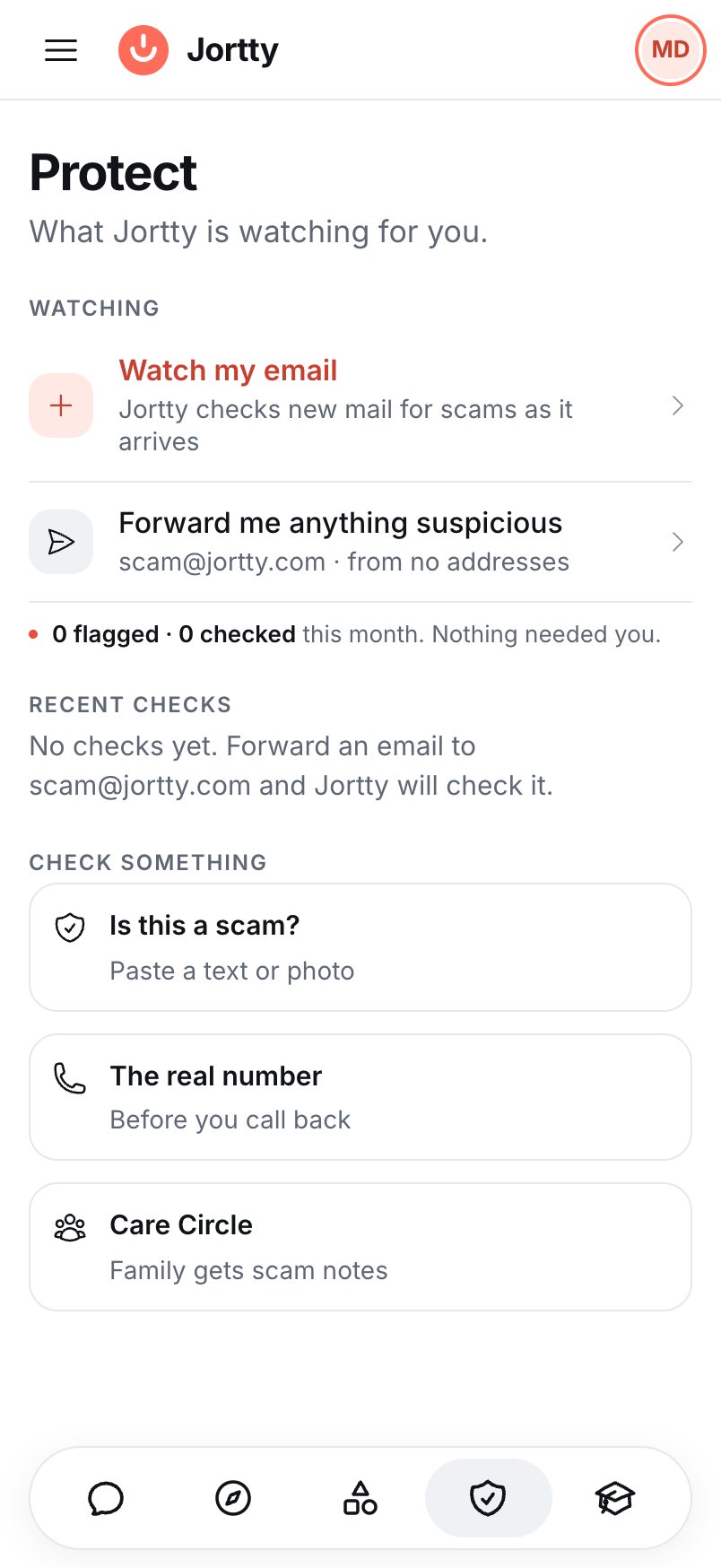
The real Protect screen in Jortty.
Protect
Everything in one place.
The Protect screen shows which inboxes Jortty is watching, your recent checks and how many emails it flagged this month.
- Watch my email. Connect an inbox once and Jortty keeps checking.
- Forward me anything suspicious. Your forwarding address is always there.
- Is this a scam? Paste a text or a photo and ask.
How Jortty decides
Facts first. Then judgment. Then the hard rules.
Jortty doesn’t guess from how an email sounds. It gathers proof first, then reads the email like a careful fraud investigator.
Step 1
It gathers the facts
- The real sender address, not just the name it shows
- For a connected inbox, whether your email provider confirmed the sender is real
- Where every link really goes, including short links
- Whether a link is on Google’s lists of known scam and malware websites
- How new the sender’s website is
- Hidden text, pictures and attachments
Step 2
It reads the email in a set order
- Who really sent it?
- Where do the links really go?
- What does it want?
- Does the story fit?
- Any hidden tricks?
Step 3
Hard rules have the last word
Some proof is too strong to argue with. These always make an email Dangerous:
- A link on a list of known scam and malware websites
- A sender name written with look-alike letters from other alphabets
- A subject line with hidden characters to slip past filters
- An e-card or invitation whose link leaves the site it claims to be from
And an email Jortty couldn’t read is never called Safe.
Four plain answers
Every check ends in one of four answers.
Jortty lands on Safe or Dangerous whenever it can tell. Each answer comes with what it checked and what to do next.
It’s real
A receipt, a reminder or a newsletter from the company it says it’s from.
Harmless, but unwanted
Ads, sales pitches and junk mail that ask for nothing risky. Not a threat, just not worth your time.
Check first
It asks for something risky, like a password or a payment, and Jortty can’t confirm it’s genuine.
It’s a scam
It lies about who sent it, its links go somewhere else, or it follows a known scam pattern. Don’t tap anything.
The answer
You’ll know why, and what to do.
Jortty explains exactly how it knows, in plain words, and gives you two or three clear steps. Next time, you’ll recognize the trick yourself.
- Alerts by email and in Jortty when a connected inbox gets something dangerous.
- Your Care Circle hears too. On Premium and Elite, family in your Care Circle get a note when Jortty flags an email as Dangerous or Suspicious.
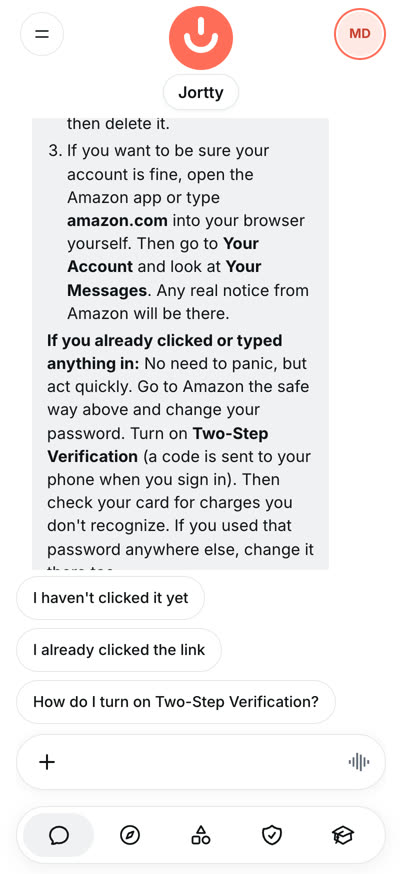
The end of a real answer, with the steps to take.
Your privacy
Jortty only looks. It never touches.
Read-only
Inbox access is read-only. Jortty never moves, sends or deletes your email.
Deleted after 7 days
The text of a checked email is deleted 7 days after the check. The result is kept so you can look back.
Never paywalled
Scam checks work at full strength on every plan, including Free.
On every plan
Protection doesn’t depend on your plan.
Checks on a connected inbox are free. On Free, you can check 10 messages a month. On Premium and Elite, forwarded emails never use credits.
Ask before you click.
Start free, and forward your first email in a minute.
Screens are real Jortty, recorded on our test system with a demo account.